Notebook 4 : Trees and Ensemble Methods
Notebook prepared by Chloé-Agathe Azencott and contributions from Giann Karlo.
In this notebook, we will discover decision trees and ensemble methods (random forests, gradient boosting).
# load numpy as np, matplotlib as plt
%matplotlib inline
import numpy as np
import matplotlib.pyplot as pltplt.rc('font', **{'size': 12}) # sets the global font size for plots (in pt)import pandas as pd1. Data Loading
The goal of this notebook is to use the visual description of a mushroom to predict whether it is edible or not.
The data is available in data/mushrooms.csv. It comes from the dataset https://archive.ics.uci.edu/ml/datasets/Mushroom but slightly modified.
It contains a first line (header) describing the columns, then one line per mushroom. The values of the different variables are all represented by letters; here is their meaning:
- cap-shape: bell=b,conical=c,convex=x,flat=f, knobbed=k,sunken=s
- cap-surface: fibrous=f,grooves=g,scaly=y,smooth=s
- cap-color: brown=n,buff=b,cinnamon=c,gray=g,green=r, pink=p,purple=u,red=e,white=w,yellow=y
- bruises: bruises=t,no=f
- odor: almond=a,anise=l,creosote=c,fishy=y,foul=f, musty=m,none=n,pungent=p,spicy=s
- gill-attachment: attached=a,descending=d,free=f,notched=n
- gill-spacing: close=c,crowded=w,distant=d
- gill-size: broad=b,narrow=n
- gill-color: black=k,brown=n,buff=b,chocolate=h,gray=g, green=r,orange=o,pink=p,purple=u,red=e, white=w,yellow=y
- stalk-shape: enlarging=e,tapering=t
- stalk-root: bulbous=b,club=c,cup=u,equal=e, rhizomorphs=z,rooted=r,missing=?
- stalk-surface-above-ring: fibrous=f,scaly=y,silky=k,smooth=s
- stalk-surface-below-ring: fibrous=f,scaly=y,silky=k,smooth=s
- stalk-color-above-ring: brown=n,buff=b,cinnamon=c,gray=g,orange=o, pink=p,red=e,white=w,yellow=y
- stalk-color-below-ring: brown=n,buff=b,cinnamon=c,gray=g,orange=o, pink=p,red=e,white=w,yellow=y
- veil-type: partial=p,universal=u
- veil-color: brown=n,orange=o,white=w,yellow=y
- ring-number: none=n,one=o,two=t
- ring-type: cobwebby=c,evanescent=e,flaring=f,large=l, none=n,pendant=p,sheathing=s,zone=z
- spore-print-color: black=k,brown=n,buff=b,chocolate=h,green=r, orange=o,purple=u,white=w,yellow=y
- population: abundant=a,clustered=c,numerous=n, scattered=s,several=v,solitary=y
- habitat: grasses=g,leaves=l,meadows=m,paths=p, urban=u,waste=w,woods=d
The first column tells us the class of each mushroom, ‘e’ for edible and ‘p’ for poisonous.
Alternatively: If you need to download the file (e.g., on Colab), uncomment the following two lines:
# !wget https://raw.githubusercontent.com/CBIO-mines/fml-dassault-systems/main/data/mushrooms.csv

# df = pd.read_csv("mushrooms.csv")
df = pd.read_csv("https://raw.githubusercontent.com/CBIO-mines/fml-dassault-systems/main/data/mushrooms.csv")
# df = pd.read_csv('data/mushrooms.csv')
df.shape(8124, 23)df.head()| class | cap-shape | cap-surface | cap-color | bruises | odor | gill-attachment | gill-spacing | gill-size | gill-color | ... | stalk-surface-below-ring | stalk-color-above-ring | stalk-color-below-ring | veil-type | veil-color | ring-number | ring-type | spore-print-color | population | habitat | |
|---|---|---|---|---|---|---|---|---|---|---|---|---|---|---|---|---|---|---|---|---|---|
| 0 | p | x | s | n | t | p | f | c | n | k | ... | s | w | w | p | w | o | p | k | s | u |
| 1 | e | x | s | y | t | a | f | c | b | k | ... | s | w | w | p | w | o | p | n | n | g |
| 2 | e | b | s | w | t | l | f | c | b | n | ... | s | w | w | p | w | o | p | n | n | m |
| 3 | p | x | y | w | t | p | f | c | n | n | ... | s | w | w | p | w | o | p | k | s | u |
| 4 | e | x | s | g | f | n | f | w | b | k | ... | s | w | w | p | w | o | e | n | a | g |
5 rows × 23 columns
Converting variables to numerical values
Our variables are currently categorical.
For example, for the “cap shape” variable, b corresponds to a bell cap, c to a conical cap, f to a flat cap, k to a knobbed cap, s to a sunken cap, and x to a convex cap.
To work with this data, we need to convert these categories into numerical values.
One possibility is to convert each letter into a number between 0 and the total number of categories, using preprocessing.LabelEncoder.
This encoding is not necessarily ideal: an algorithm that uses Euclidean distance will consider a convex cap (x converted to 5) to be closer to a sunken cap (s converted to 4) than to a conical cap (c converted to 1), which doesn’t make much sense. However, this is not a problem for algorithms based on decision trees, which treat categories as such and not as numerical values. The conversion is only necessary for implementation reasons.
One-hot encoding is generally a better choice. Note, however, that it has the disadvantage of increasing the number of variables and creating correlated variables.
from sklearn import preprocessinglabel_encoder = preprocessing.LabelEncoder()
# manual_class = {'e': 1, 'p': 0}
# df['class'] = df['class'].map(manual_class)
for col in df.columns[:]:
df[col] = label_encoder.fit_transform(df[col])We can observe our data again:
df.head()| class | cap-shape | cap-surface | cap-color | bruises | odor | gill-attachment | gill-spacing | gill-size | gill-color | ... | stalk-surface-below-ring | stalk-color-above-ring | stalk-color-below-ring | veil-type | veil-color | ring-number | ring-type | spore-print-color | population | habitat | |
|---|---|---|---|---|---|---|---|---|---|---|---|---|---|---|---|---|---|---|---|---|---|
| 0 | 1 | 5 | 2 | 4 | 1 | 6 | 1 | 0 | 1 | 4 | ... | 2 | 7 | 7 | 0 | 2 | 1 | 4 | 2 | 3 | 5 |
| 1 | 0 | 5 | 2 | 9 | 1 | 0 | 1 | 0 | 0 | 4 | ... | 2 | 7 | 7 | 0 | 2 | 1 | 4 | 3 | 2 | 1 |
| 2 | 0 | 0 | 2 | 8 | 1 | 3 | 1 | 0 | 0 | 5 | ... | 2 | 7 | 7 | 0 | 2 | 1 | 4 | 3 | 2 | 3 |
| 3 | 1 | 5 | 3 | 8 | 1 | 6 | 1 | 0 | 1 | 5 | ... | 2 | 7 | 7 | 0 | 2 | 1 | 4 | 2 | 3 | 5 |
| 4 | 0 | 5 | 2 | 3 | 0 | 5 | 1 | 1 | 0 | 4 | ... | 2 | 7 | 7 | 0 | 2 | 1 | 0 | 3 | 0 | 1 |
5 rows × 23 columns
Creating the X and y data matrices
X = np.array(df.drop(columns=['class']))
y = np.array(df['class'])
print(X.shape, y.shape)
(8124, 22) (8124,)Question: How many samples (examples) does our dataset contain? How many variables?
2. Selection and evaluation framework
We can now split our data into a training set and a test set, and then fix a split of the training set into 10 folds for cross-validation.
You will need the functions train_test_split and KFold
from sklearn import model_selectionTraining and test set
### START OF YOUR CODE
X_train, X_test, y_train, y_test = model_selection.train_test_split(X, y, test_size=0.25, random_state=42)
### END OF YOUR CODE
Cross-validation
n_folds = 10

### START OF YOUR CODE

# Create a KFold object that will allow cross-validation in n_folds folds
kf = model_selection.KFold(n_splits=n_folds, shuffle=True, random_state=42)

# Use kf to split the training set into n_folds folds.
# kf.split returns an iterator (consumed after a loop).
# To use the same folds multiple times, we convert this iterator into a list of indices:
kf_indices = list(kf.split(X_train))

### END OF YOUR CODE
3. Decision Tree
We will now use a decision tree to learn a classifier on our data.
Decision trees are implemented in the DecisionTreeClassifier class of scikit-learn’s tree module.
from sklearn import treeDecision tree with default hyperparameters
Let’s determine the F1 score using cross-validation for a decision tree with default hyperparameters in scikit-learn:
model_tree_default = tree.DecisionTreeClassifier()

f1_tree_default = model_selection.cross_val_score(model_tree_default, # predictor to evaluate
                                                  X_train, y_train, # training data
                                                  cv=kf_indices, # cross-validation to use
                                                  scoring='f1' # performance evaluation metric
                                                  )
print("F1 of a decision tree (default) in cross-validation: %.3f +/- %.3f" % (np.mean(f1_tree_default), np.std(f1_tree_default)))
F1 of a decision tree (default) in cross-validation: 0.878 +/- 0.016Question: What do you think of this performance?
Cross-validation of decision tree depth
By default (see the documentation), we used a decision tree with maximum depth. We will now consider the tree depth (max_depth) as a hyperparameter to optimize using a grid search. We are re-using and adapting the code used for kNN in Notebook 3.
Let’s start by defining the grid:
d_values = np.arange(2, 31)d_valuesarray([ 2, 3, 4, 5, 6, 7, 8, 9, 10, 11, 12, 13, 14, 15, 16, 17, 18,
19, 20, 21, 22, 23, 24, 25, 26, 27, 28, 29, 30])We can now use GridSearchCV:
# Instantiation of a GridSearchCV object
grid_tree = model_selection.GridSearchCV(tree.DecisionTreeClassifier(), # predictor to evaluate
                                         {'max_depth': d_values}, # dictionary of hyperparameter values
                                         cv=kf_indices, # cross-validation to use
                                         scoring='f1' # performance evaluation metric
)%%time
# Use this object on the training data
grid_tree.fit(X_train, y_train)CPU times: user 3.81 s, sys: 4.01 ms, total: 3.82 s
Wall time: 3.82 sGridSearchCV(cv=[(array([ 0, 1, 2, ..., 6090, 6091, 6092], shape=(5483,)),
array([ 8, 14, 15, 17, 23, 31, 33, 37, 44, 50, 65,
79, 80, 84, 88, 93, 101, 132, 156, 157, 167, 168,
177, 181, 185, 198, 199, 221, 228, 230, 233, 239, 254,
259, 263, 279, 296, 308, 319, 323, 324, 325, 346, 351,
371, 373, 393, 401, 408, 410, 420, 426, 439, 465, 469,
472, 476, 491, 501, 506, 530, 534, 535, 538, 544, 549,
553, 561, 565, 576, 586, 599, 604, 62...
5791, 5794, 5814, 5815, 5820, 5847, 5848, 5855, 5862, 5864, 5865,
5878, 5886, 5892, 5915, 5924, 5944, 5949, 5959, 5960, 5975, 5989,
6007, 6012, 6014, 6021, 6029, 6031, 6032, 6035, 6036, 6069, 6070,
6072, 6079, 6081, 6084]))],
estimator=DecisionTreeClassifier(),
param_grid={'max_depth': array([ 2, 3, 4, 5, 6, 7, 8, 9, 10, 11, 12, 13, 14, 15, 16, 17, 18,
19, 20, 21, 22, 23, 24, 25, 26, 27, 28, 29, 30])},
scoring='f1')In a Jupyter environment, please rerun this cell to show the HTML representation or trust the notebook. On GitHub, the HTML representation is unable to render, please try loading this page with nbviewer.org.
Parameters
DecisionTreeClassifier(max_depth=np.int64(6))
Parameters
The optimal hyperparameter value is given by:
print(grid_tree.best_params_){'max_depth': np.int64(6)}The following code allows displaying the model’s performance according to the hyperparameter value:
mean_test_score = grid_tree.cv_results_['mean_test_score']
stde_test_score = grid_tree.cv_results_['std_test_score'] / np.sqrt(n_folds) # standard error

plt.plot(d_values, mean_test_score)
plt.plot(d_values, (mean_test_score + stde_test_score), '--', color='steelblue')
plt.plot(d_values, (mean_test_score - stde_test_score), '--', color='steelblue')
plt.fill_between(d_values, (mean_test_score + stde_test_score),
                 (mean_test_score - stde_test_score), alpha=0.2)

best_index = np.where(d_values == grid_tree.best_params_['max_depth'])[0][0]
plt.scatter(d_values[best_index], mean_test_score[best_index])


plt.xlabel('maximum depth')
plt.ylabel('F1')
plt.title("Performance (in cross-validation) along the grid")
Text(0.5, 1.0, 'Performance (in cross-validation) along the grid')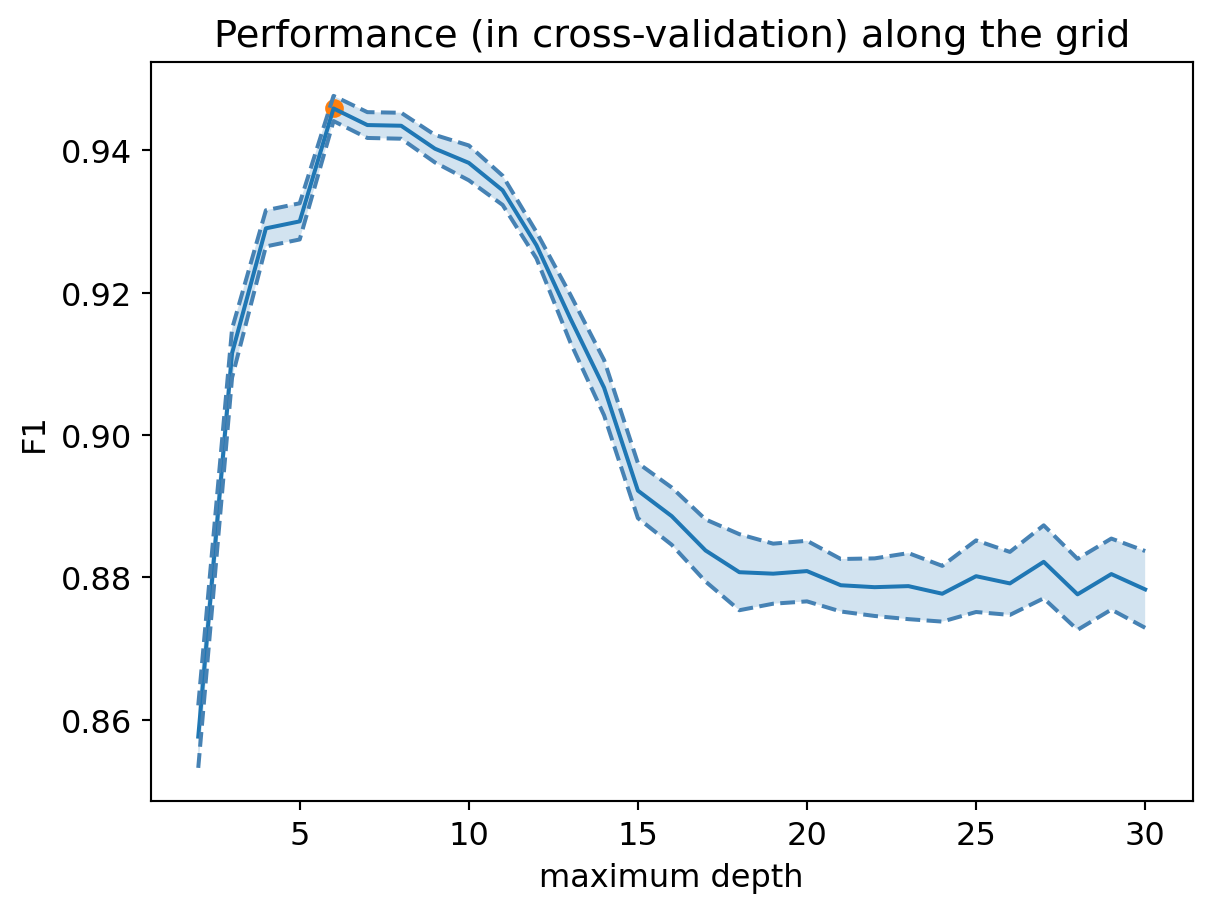
Question: What do you think of this performance?
Optimal decision tree
print("Best F1 in cross-validation: %.3f" % grid_tree.best_score_)Best F1 in cross-validation: 0.946We can now retrieve the optimal decision tree:
model_tree_best = grid_tree.best_estimator_4. Interpretation of the decision tree
Visualization
The plot_tree method of scikit-learn’s tree module allows us to visualize the optimal decision tree:
fig = plt.figure(figsize=(25, 20))
tree.plot_tree(model_tree_best, fontsize=12)
plt.show()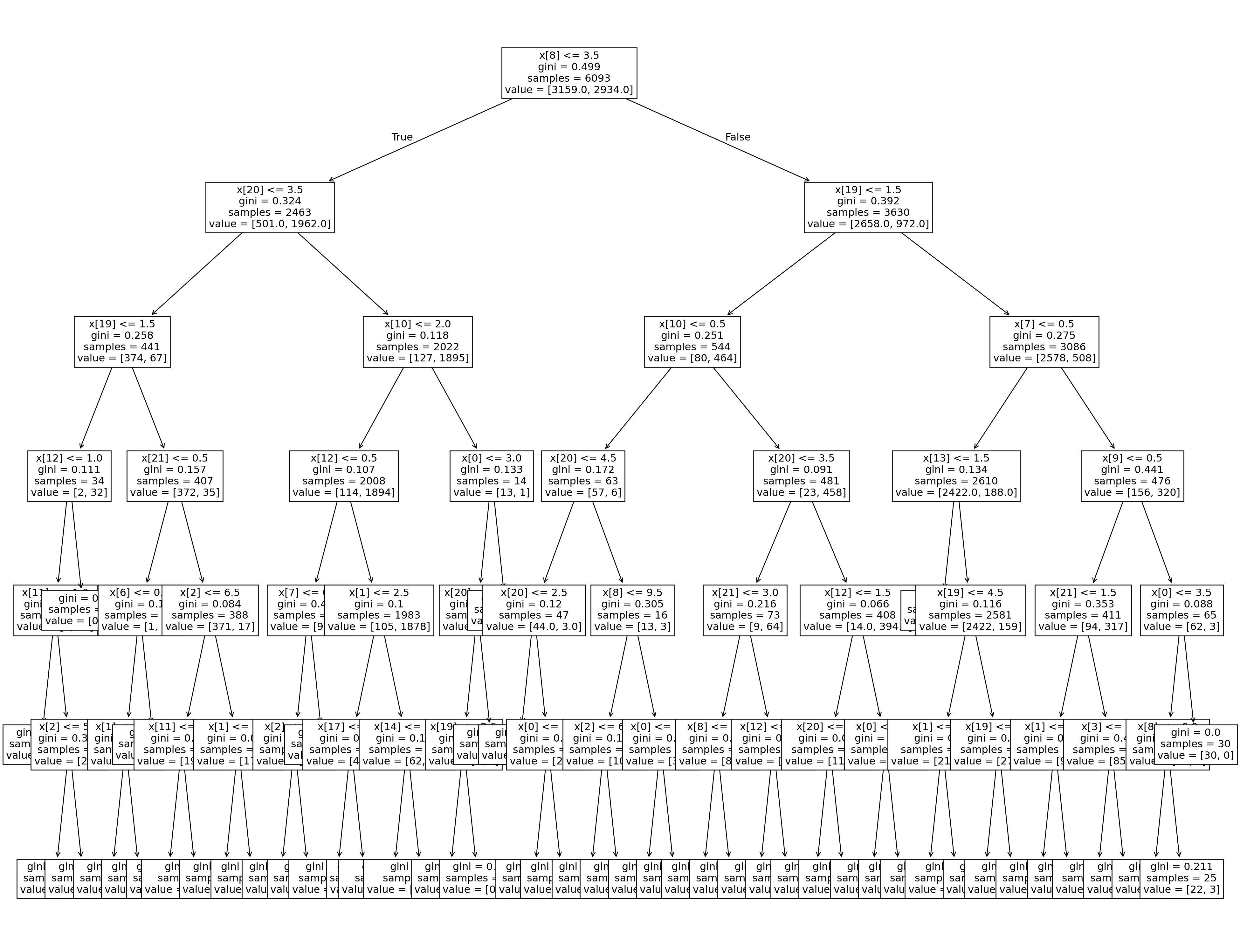
Question: Does the learned model seem interpretable to you?
Variable Importance
To interpret the decision tree, we can also look at the importance of each variable. It is greater the more the variable helps to reduce the tree’s classification error.
fig = plt.figure(figsize=(12, 6))

num_features = X_train.shape[1]

# Display decision tree importances
plt.scatter(range(num_features), model_tree_best.feature_importances_,
           label="Decision Tree")

# Legend
tmp = plt.legend(fontsize=14)

# X-axis
plt.xlabel('Variables', fontsize=14)
feature_names = list(df.columns[1:])
tmp = plt.xticks(range(num_features), feature_names,
                 rotation=90, fontsize=14)

# Y-axis
tmp = plt.ylabel('Importance', fontsize=14)

# Title
tmp = plt.title('Variable Importance', fontsize=16)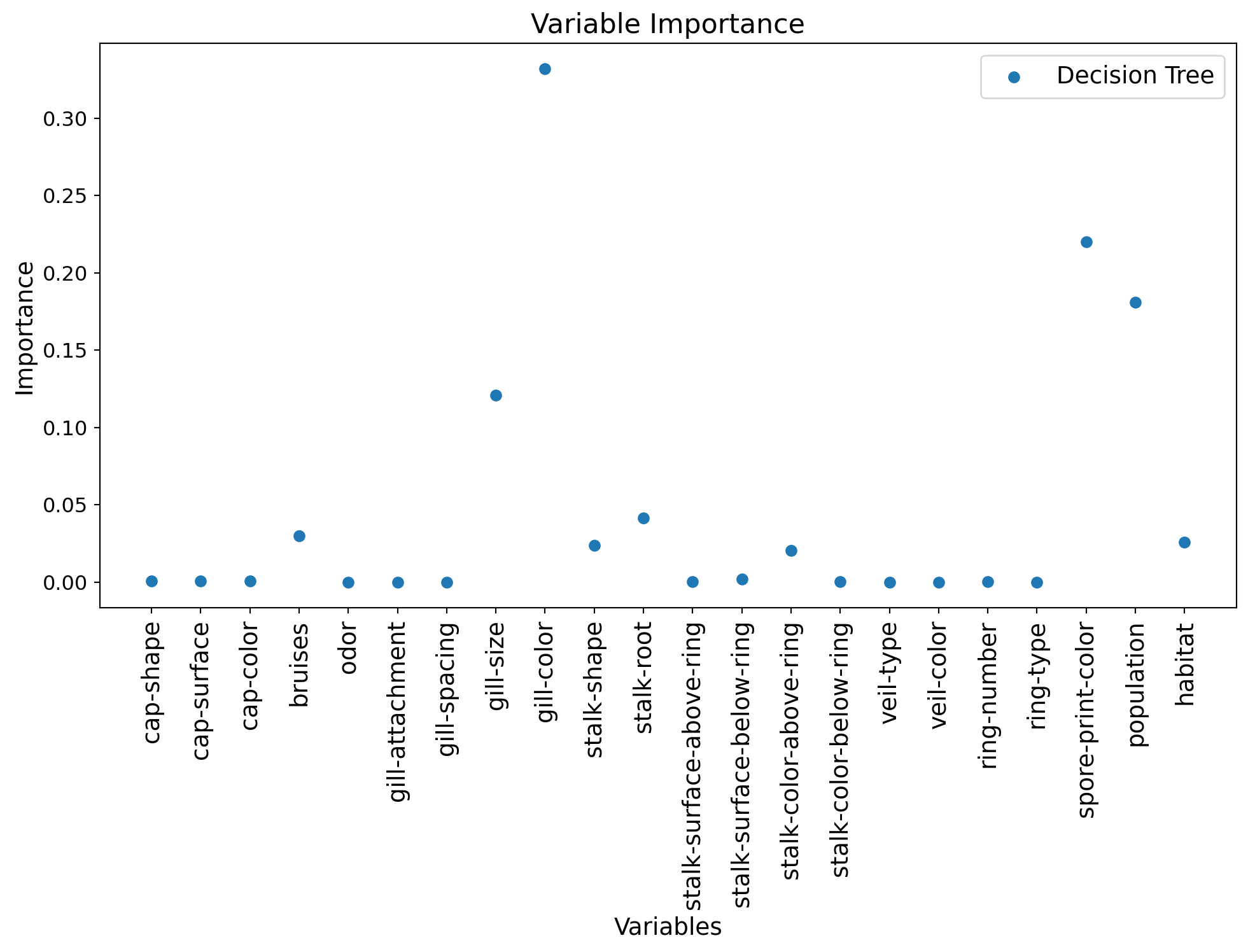
Comparison to logistic regression
We can also compare these importances to the regression coefficients of a logistic regression:
from sklearn import linear_modelTrain a regularized logistic regression model (Ridge regularization, or “L2”) with a grid search on the value of the regularization coefficient C, using cross-validation:
c_values = np.logspace(-3, 3, 50)

### START OF YOUR CODE

# Center and scale the data
from sklearn.preprocessing import StandardScaler
std_scaler = StandardScaler()
X_train_scaled = std_scaler.fit_transform(X_train)
X_test_scaled = std_scaler.transform(X_test)

# Instantiation of a GridSearchCV object
grid_logreg = model_selection.GridSearchCV(linear_model.LogisticRegression(solver='liblinear'),
                                          {'C': c_values},
                                          cv=kf_indices,
                                          scoring='f1')

# Application to training data
grid_logreg.fit(X_train_scaled, y_train)

### END OF YOUR CODE
GridSearchCV(cv=[(array([ 0, 1, 2, ..., 6090, 6091, 6092], shape=(5483,)),
array([ 8, 14, 15, 17, 23, 31, 33, 37, 44, 50, 65,
79, 80, 84, 88, 93, 101, 132, 156, 157, 167, 168,
177, 181, 185, 198, 199, 221, 228, 230, 233, 239, 254,
259, 263, 279, 296, 308, 319, 323, 324, 325, 346, 351,
371, 373, 393, 401, 408, 410, 420, 426, 439, 465, 469,
472, 476, 491, 501, 506, 530, 534, 535, 538, 544, 549,
553, 561, 565, 576, 586, 599, 604, 62...
8.68511374e-01, 1.15139540e+00, 1.52641797e+00, 2.02358965e+00,
2.68269580e+00, 3.55648031e+00, 4.71486636e+00, 6.25055193e+00,
8.28642773e+00, 1.09854114e+01, 1.45634848e+01, 1.93069773e+01,
2.55954792e+01, 3.39322177e+01, 4.49843267e+01, 5.96362332e+01,
7.90604321e+01, 1.04811313e+02, 1.38949549e+02, 1.84206997e+02,
2.44205309e+02, 3.23745754e+02, 4.29193426e+02, 5.68986603e+02,
7.54312006e+02, 1.00000000e+03])},
scoring='f1')In a Jupyter environment, please rerun this cell to show the HTML representation or trust the notebook. On GitHub, the HTML representation is unable to render, please try loading this page with nbviewer.org.
Parameters
LogisticRegression(C=np.float64(1.151395399326447), solver='liblinear')
Parameters
print("Best F1 in cross-validation: %.3f" % grid_logreg.best_score_)Best F1 in cross-validation: 0.902Question: Compare this performance to that of the decision tree.
fig = plt.figure(figsize=(12, 6))

num_features = X_train.shape[1]

# Scale importances between 0 and 1
tree_importances = model_tree_best.feature_importances_
tree_importances_min = np.min(tree_importances)
tree_importances_max = np.max(tree_importances)
tree_importances = (tree_importances-tree_importances_min)/(tree_importances_max-tree_importances_min)

# Display decision tree importances
plt.bar(range(num_features), tree_importances,
           label="Decision Tree", width=0.4)

# Scale absolute values of linear model coefficients between 0 and 1
logreg_coeffs = np.abs(grid_logreg.best_estimator_.coef_[0])
logreg_coeffs_min = np.min(logreg_coeffs)
logreg_coeffs_max = np.max(logreg_coeffs)
logreg_coeffs = (logreg_coeffs-logreg_coeffs_min)/(logreg_coeffs_max-logreg_coeffs_min)

# Display logistic regression importances
plt.bar((np.arange(num_features)+0.4), logreg_coeffs,
           label="Logistic Regression", width=0.4)


# Legend
tmp = plt.legend(fontsize=14)

# X-axis
plt.xlabel('Variables', fontsize=14)
feature_names = list(df.columns[1:])
tmp = plt.xticks(range(num_features), feature_names,
                 rotation=90, fontsize=14)

# Y-axis
tmp = plt.ylabel('Importance', fontsize=14)

# Title
tmp = plt.title('Variable Importance', fontsize=16)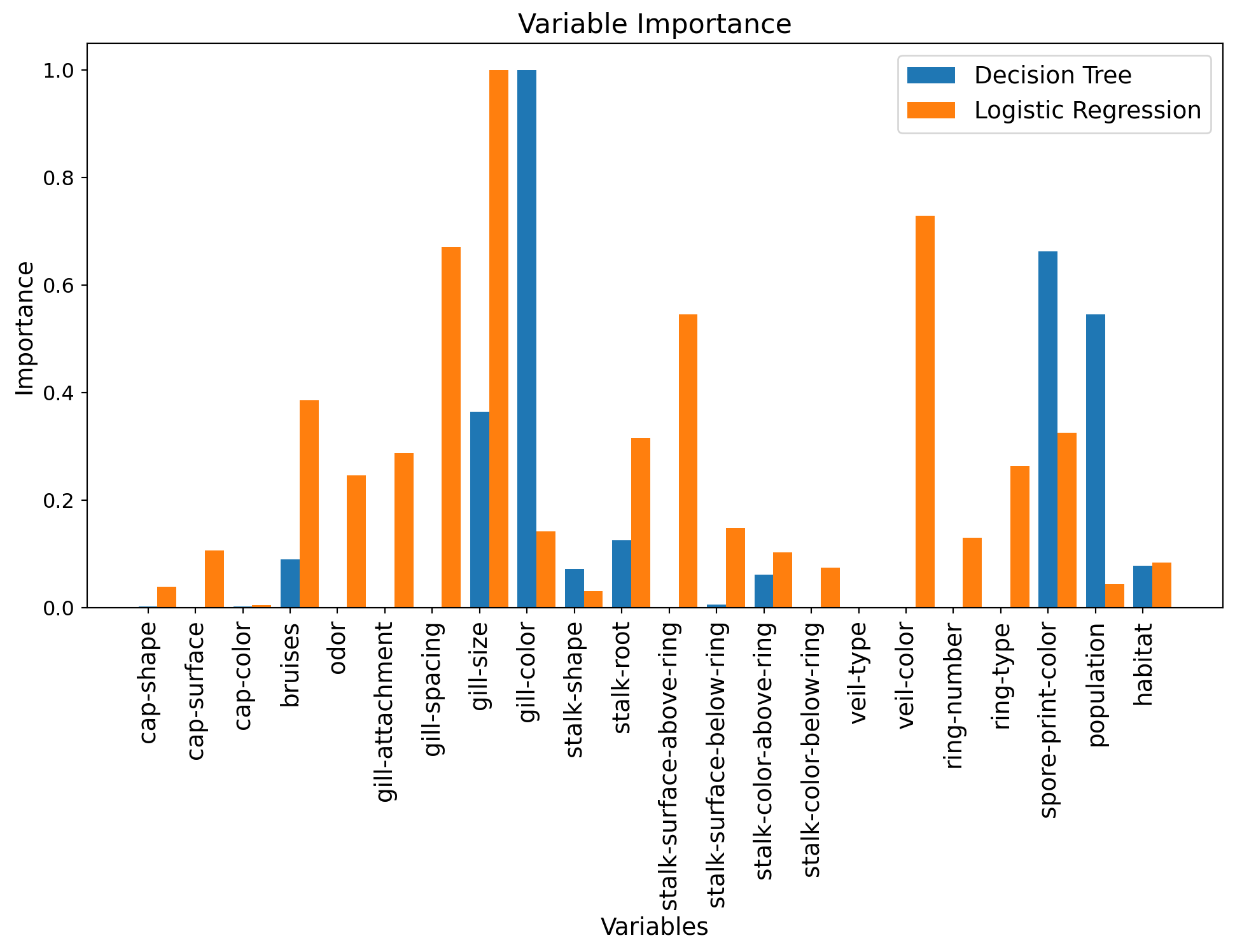
Question: How do these importances compare?
5. Random Forest
Can we improve the decision tree’s performance using an ensemble method? We will use a random forest here, implemented in the RandomForestClassifier class of scikit-learn’s ensemble module.
from sklearn import ensembleCross-validation of the number of trees and their maximum depth.
We will now consider two hyperparameters, the maximum depth of each tree (max_depth), and the number of trees in the forest (n_estimators).
Let’s start by defining the grid:
d_values = np.array([3, 4, 10])
n_values = np.array([10, 20, 50, 100, 200])#, 100, 200, 500])
We can now use GridSearchCV:
### START OF YOUR CODE

# Instantiation of a GridSearchCV object
grid_rf = model_selection.GridSearchCV(ensemble.RandomForestClassifier(),
                                      {'max_depth': d_values, 'n_estimators': n_values},
                                      cv=kf_indices,
                                      scoring='f1')

# Use this object on the training data
grid_rf.fit(X_train, y_train)

### END OF YOUR CODE
GridSearchCV(cv=[(array([ 0, 1, 2, ..., 6090, 6091, 6092], shape=(5483,)),
array([ 8, 14, 15, 17, 23, 31, 33, 37, 44, 50, 65,
79, 80, 84, 88, 93, 101, 132, 156, 157, 167, 168,
177, 181, 185, 198, 199, 221, 228, 230, 233, 239, 254,
259, 263, 279, 296, 308, 319, 323, 324, 325, 346, 351,
371, 373, 393, 401, 408, 410, 420, 426, 439, 465, 469,
472, 476, 491, 501, 506, 530, 534, 535, 538, 544, 549,
553, 561, 565, 576, 586, 599, 604, 62...
5685, 5686, 5699, 5727, 5730, 5734, 5739, 5749, 5757, 5759, 5766,
5791, 5794, 5814, 5815, 5820, 5847, 5848, 5855, 5862, 5864, 5865,
5878, 5886, 5892, 5915, 5924, 5944, 5949, 5959, 5960, 5975, 5989,
6007, 6012, 6014, 6021, 6029, 6031, 6032, 6035, 6036, 6069, 6070,
6072, 6079, 6081, 6084]))],
estimator=RandomForestClassifier(),
param_grid={'max_depth': array([ 3, 4, 10]),
'n_estimators': array([ 10, 20, 50, 100, 200])},
scoring='f1')In a Jupyter environment, please rerun this cell to show the HTML representation or trust the notebook. On GitHub, the HTML representation is unable to render, please try loading this page with nbviewer.org.
Parameters
RandomForestClassifier(max_depth=np.int64(10), n_estimators=np.int64(50))
Parameters
The optimal hyperparameter values are given by:
print(grid_rf.best_params_){'max_depth': np.int64(10), 'n_estimators': np.int64(50)}And we can display the model’s performance according to the value of each of the two hyperparameters:
# Reshape scores into a 2D array
mean_test_score_array = np.reshape(grid_rf.cv_results_['mean_test_score'], (len(d_values), len(n_values)))
std_test_score_array = np.reshape(grid_rf.cv_results_['std_test_score'], (len(d_values), len(n_values)))
for (idx, d) in enumerate(d_values):
mean_test_score = mean_test_score_array[idx, :]
stde_test_score = std_test_score_array[idx, :] / np.sqrt(n_folds) # standard error
p = plt.plot(n_values, mean_test_score, label="Max depth = %d" % d)
plt.plot(n_values, (mean_test_score + stde_test_score), '--', color=p[0].get_color())
plt.plot(n_values, (mean_test_score - stde_test_score), '--', color=p[0].get_color())
plt.fill_between(n_values, (mean_test_score + stde_test_score),
(mean_test_score - stde_test_score), alpha=0.2)
# Display best hyperparameters
if d == grid_rf.best_params_['max_depth']:
best_ntree_index = np.where(n_values == grid_rf.best_params_['n_estimators'])[0][0]
plt.scatter(n_values[best_ntree_index], mean_test_score[best_ntree_index],
marker='*', s=200, color='red')
plt.legend(loc=(1.1, 0))
plt.xlabel("Number of trees")
plt.ylabel('F1')
plt.title("Performance (in cross-validation) along the grid")
plt.xscale('log') # use a logarithmic scale on the x-axis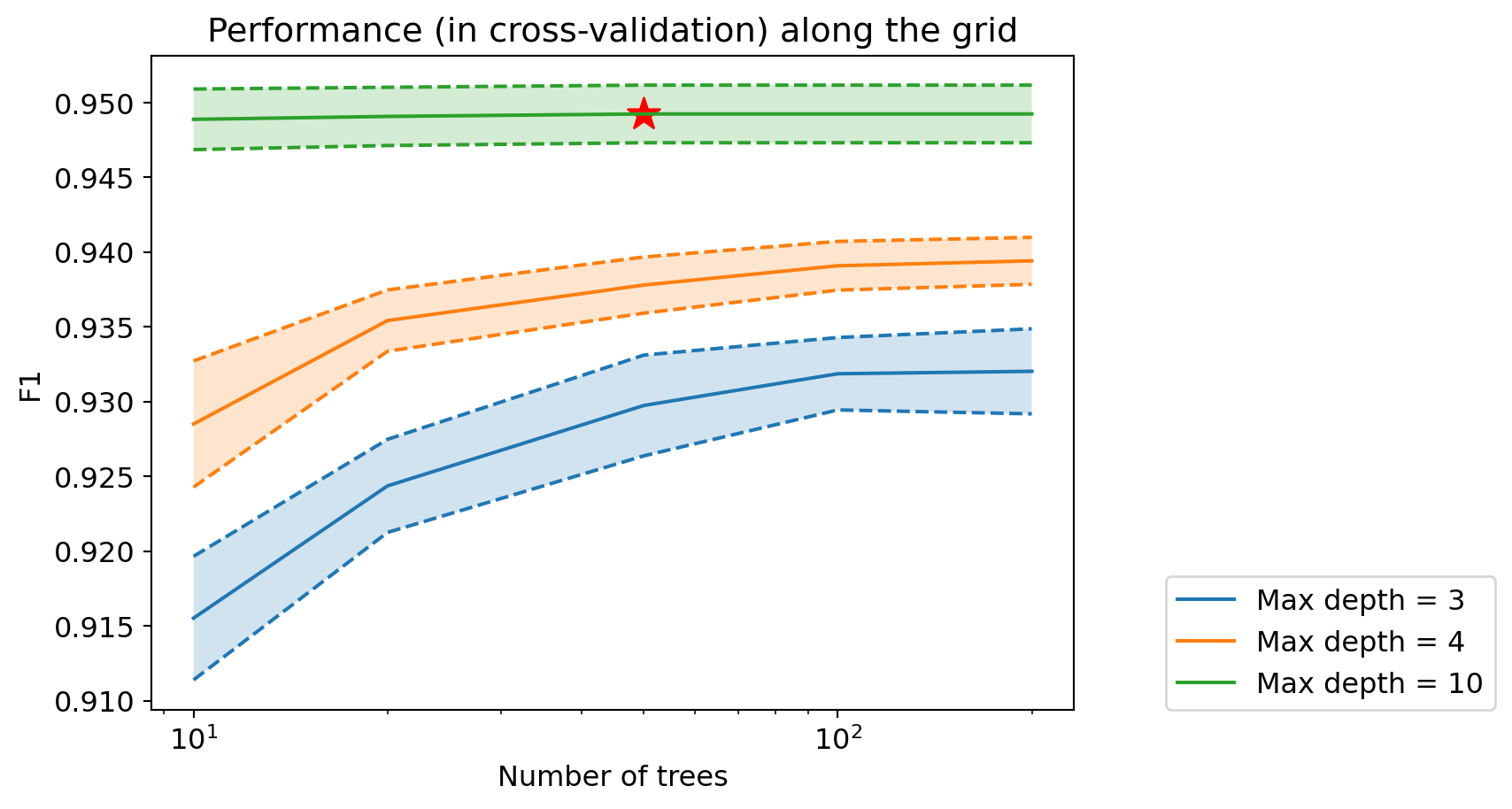
Question: How does the performance of random forests compare to previous performances?
Optimal random forest
print("Best F1 in cross-validation: %.3f" % grid_rf.best_score_)Best F1 in cross-validation: 0.949We can now retrieve the optimal decision tree:
model_rf_best = grid_rf.best_estimator_Variable Importance
We can once again look at the importance of each variable, for the best random forest model:
fig = plt.figure(figsize=(12, 6))

num_features = X_train.shape[1]

# Scale importances between 0 and 1
tree_importances = model_tree_best.feature_importances_
tree_importances_min = np.min(tree_importances)
tree_importances_max = np.max(tree_importances)
tree_importances = (tree_importances-tree_importances_min)/(tree_importances_max-tree_importances_min)

# Display decision tree importances
plt.bar(range(num_features), tree_importances,
           label="Decision Tree", width=0.3)

# Scale absolute values of linear model coefficients between 0 and 1
logreg_coeffs = np.abs(grid_logreg.best_estimator_.coef_[0])
logreg_coeffs_min = np.min(logreg_coeffs)
logreg_coeffs_max = np.max(logreg_coeffs)
logreg_coeffs = (logreg_coeffs-logreg_coeffs_min)/(logreg_coeffs_max-logreg_coeffs_min)

# Display logistic regression importances
plt.bar((np.arange(num_features)+0.3), logreg_coeffs,
           label="Logistic Regression", width=0.3)

# Scale importances between 0 and 1
rf_importances = model_rf_best.feature_importances_
rf_importances_min = np.min(rf_importances)
rf_importances_max = np.max(rf_importances)
rf_importances = (rf_importances-rf_importances_min)/(rf_importances_max-rf_importances_min)

# Display forest importances
plt.bar((np.arange(num_features)+0.6),  rf_importances,
           label="Random Forest", width=0.3)


# Legend
tmp = plt.legend()

# X-axis
plt.xlabel('Variables')
feature_names = list(df.columns[1:])
tmp = plt.xticks(range(num_features), feature_names,
                 rotation=90, fontsize=14)

# Y-axis
tmp = plt.ylabel('Importance')

# Title
tmp = plt.title('Variable Importance')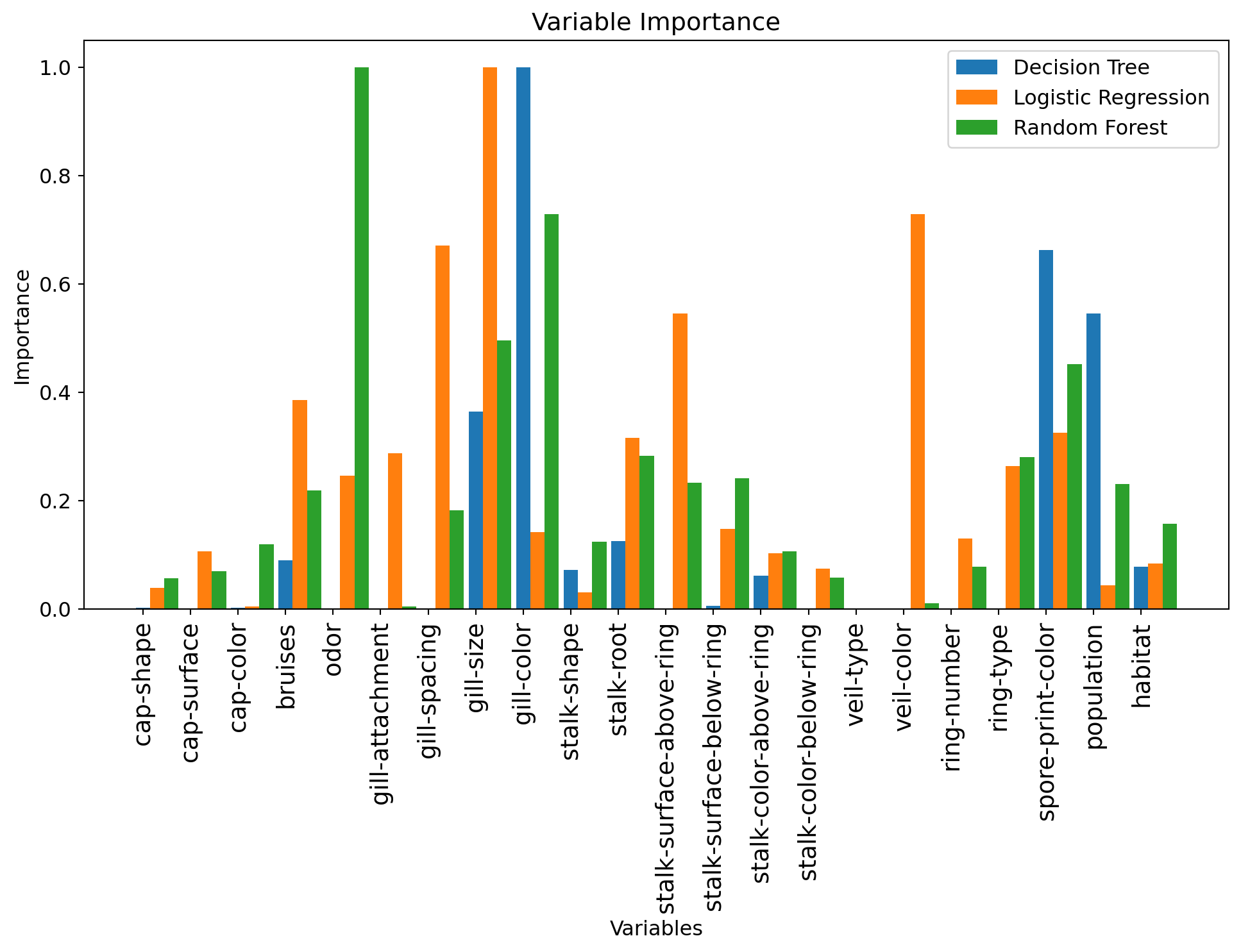
Question: What are the most important variables now? How does this compare to previous models?
6. Gradient Boosting
Gradient boosting is implemented in scikit-learn in the GradientBoostingClassifier class of the ensemble module.
Cross-validation and hyperparameter selection
As with random forests, we will optimize the number of estimators and the depth of the trees here.
n_values = np.array([10, 20, 50, 100, 200])
d_values = np.array([3, 4, 7])
We can now use GridSearchCV:
### START OF YOUR CODE

# Instantiation of a GridSearchCV object
grid_boost = model_selection.GridSearchCV(ensemble.GradientBoostingClassifier(),
                                         {'n_estimators': n_values, 'max_depth': d_values},
                                         cv=kf_indices,
                                         scoring='f1')

# Use this object on the training data
grid_boost.fit(X_train, y_train)

### END OF YOUR CODE
GridSearchCV(cv=[(array([ 0, 1, 2, ..., 6090, 6091, 6092], shape=(5483,)),
array([ 8, 14, 15, 17, 23, 31, 33, 37, 44, 50, 65,
79, 80, 84, 88, 93, 101, 132, 156, 157, 167, 168,
177, 181, 185, 198, 199, 221, 228, 230, 233, 239, 254,
259, 263, 279, 296, 308, 319, 323, 324, 325, 346, 351,
371, 373, 393, 401, 408, 410, 420, 426, 439, 465, 469,
472, 476, 491, 501, 506, 530, 534, 535, 538, 544, 549,
553, 561, 565, 576, 586, 599, 604, 62...
5685, 5686, 5699, 5727, 5730, 5734, 5739, 5749, 5757, 5759, 5766,
5791, 5794, 5814, 5815, 5820, 5847, 5848, 5855, 5862, 5864, 5865,
5878, 5886, 5892, 5915, 5924, 5944, 5949, 5959, 5960, 5975, 5989,
6007, 6012, 6014, 6021, 6029, 6031, 6032, 6035, 6036, 6069, 6070,
6072, 6079, 6081, 6084]))],
estimator=GradientBoostingClassifier(),
param_grid={'max_depth': array([3, 4, 7]),
'n_estimators': array([ 10, 20, 50, 100, 200])},
scoring='f1')In a Jupyter environment, please rerun this cell to show the HTML representation or trust the notebook. On GitHub, the HTML representation is unable to render, please try loading this page with nbviewer.org.
Parameters
GradientBoostingClassifier(max_depth=np.int64(4), n_estimators=np.int64(100))
Parameters
The optimal hyperparameter values are given by:
print(grid_boost.best_params_){'max_depth': np.int64(4), 'n_estimators': np.int64(100)}And we can display the model’s performance according to the value of each of the two hyperparameters:
# Reshape scores into a 2D array
mean_test_score_array = np.reshape(grid_boost.cv_results_['mean_test_score'], (len(d_values), len(n_values)))
std_test_score_array = np.reshape(grid_boost.cv_results_['std_test_score'], (len(d_values), len(n_values)))
for (idx, d) in enumerate(d_values):
mean_test_score = mean_test_score_array[idx, :]
stde_test_score = std_test_score_array[idx, :] / np.sqrt(n_folds) # standard error
p = plt.plot(n_values, mean_test_score, label="Max depth = %d" % d)
plt.plot(n_values, (mean_test_score + stde_test_score), '--', color=p[0].get_color())
plt.plot(n_values, (mean_test_score - stde_test_score), '--', color=p[0].get_color())
plt.fill_between(n_values, (mean_test_score + stde_test_score),
(mean_test_score - stde_test_score), alpha=0.2)
# Display best hyperparameters
if d == grid_boost.best_params_['max_depth']:
best_ntree_index = np.where(n_values == grid_boost.best_params_['n_estimators'])[0][0]
plt.scatter(n_values[best_ntree_index], mean_test_score[best_ntree_index],
marker='*', s=200, color='red')
plt.legend(loc=(1.1, 0))
plt.xlabel("Number of trees")
plt.ylabel('F1')
plt.title("Performance (in cross-validation) along the grid")
plt.xscale('log') # use a logarithmic scale on the x-axis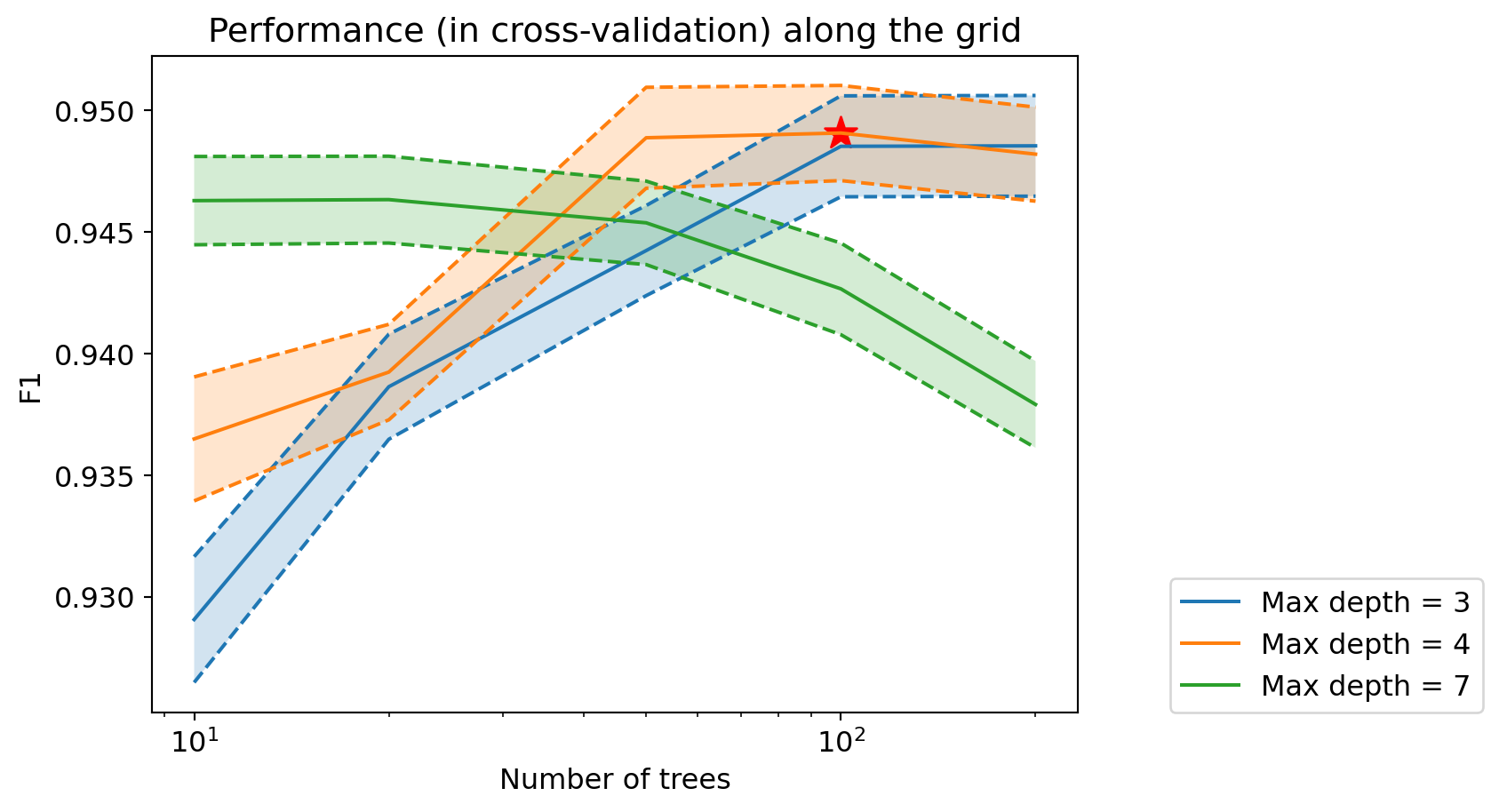
Question: How does the performance of gradient boosting evolve based on hyperparameter values? How does it compare to previous performances?
Optimal Boosting
print("Best F1 in cross-validation: %.3f" % grid_boost.best_score_)Best F1 in cross-validation: 0.949We can now retrieve the optimal decision tree:
model_boost_best = grid_boost.best_estimator_Variable Importance
We can once again look at the importance of each variable:
fig = plt.figure(figsize=(12, 6))

num_features = X_train.shape[1]

### Decision Tree
# Scale importances between 0 and 1
tree_importances = model_tree_best.feature_importances_
tree_importances_min = np.min(tree_importances)
tree_importances_max = np.max(tree_importances)
tree_importances = (tree_importances-tree_importances_min)/(tree_importances_max-tree_importances_min)

# Display decision tree importances
plt.bar(range(num_features), tree_importances,
           label="Decision Tree", width=0.2)

### Logistic Regression
# Scale absolute values of linear model coefficients between 0 and 1
logreg_coeffs = np.abs(grid_logreg.best_estimator_.coef_[0])
logreg_coeffs_min = np.min(logreg_coeffs)
logreg_coeffs_max = np.max(logreg_coeffs)
logreg_coeffs = (logreg_coeffs-logreg_coeffs_min)/(logreg_coeffs_max-logreg_coeffs_min)

# Display logistic regression importances
plt.bar((np.arange(num_features)+0.2), logreg_coeffs,
           label="Logistic Regression", width=0.2)

### Random Forest
# Scale importances between 0 and 1
rf_importances = model_rf_best.feature_importances_
rf_importances_min = np.min(rf_importances)
rf_importances_max = np.max(rf_importances)
rf_importances = (rf_importances-rf_importances_min)/(rf_importances_max-rf_importances_min)

# Display forest importances
plt.bar((np.arange(num_features)+0.4),  rf_importances,
           label="Random Forest", width=0.2)

### Boosting
# Scale importances between 0 and 1
boost_importances = model_boost_best.feature_importances_
boost_importances_min = np.min(boost_importances)
boost_importances_max = np.max(boost_importances)
boost_importances = (boost_importances-boost_importances_min)/(boost_importances_max-boost_importances_min)

# Display boosting importances
plt.bar((np.arange(num_features)+0.6),  boost_importances,
           label="Boosting", width=0.2)

# Legend
tmp = plt.legend()

# X-axis
plt.xlabel('Variables')
feature_names = list(df.columns[1:])
tmp = plt.xticks(range(num_features), feature_names,
                 rotation=90, fontsize=14)

# Y-axis
tmp = plt.ylabel('Importance')

# Title
tmp = plt.title('Variable Importance')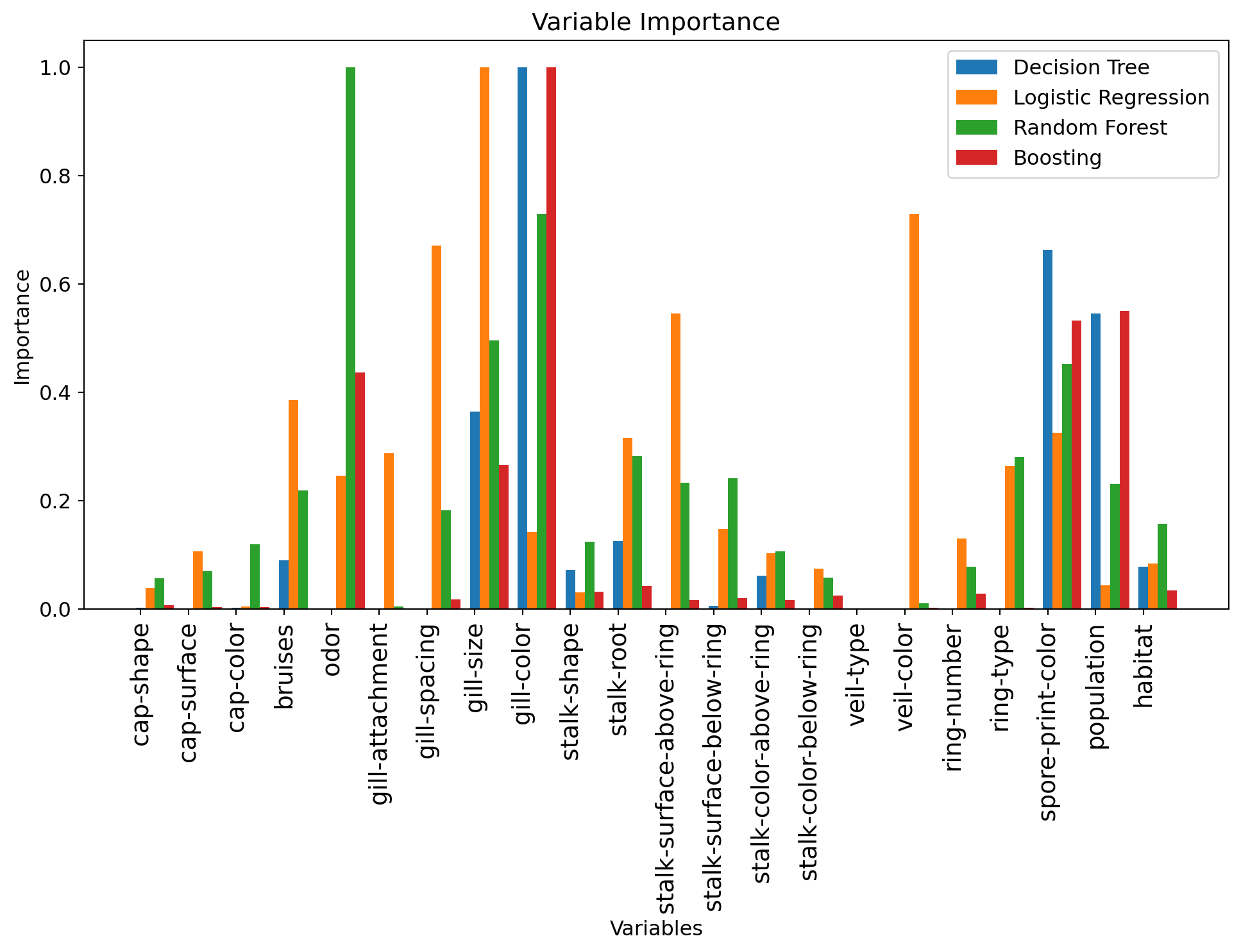
Question: What are the most important variables now? How does this compare to previous models?
7. Final Model
Question: Which of these models do you choose as the most performant for classifying mushrooms in the test set?
You will now evaluate the model you have chosen on the test set:
my_model = model_boost_best # TODO : insert the name of the model you have chosen here.
#model_tree_best
#model_rf_best

# Predict on the test set
y_pred = my_model.predict(X_test)
from sklearn import metrics
print("F1 of the chosen model on the test set: %.3f" % metrics.f1_score(y_test, y_pred))F1 of the chosen model on the test set: 0.948Question: What do you think of this performance? Is there a risk of overfitting?
Confusion Matrix
To better interpret the results, we can also visualize the confusion matrix:
metrics.ConfusionMatrixDisplay.from_predictions(y_test, y_pred)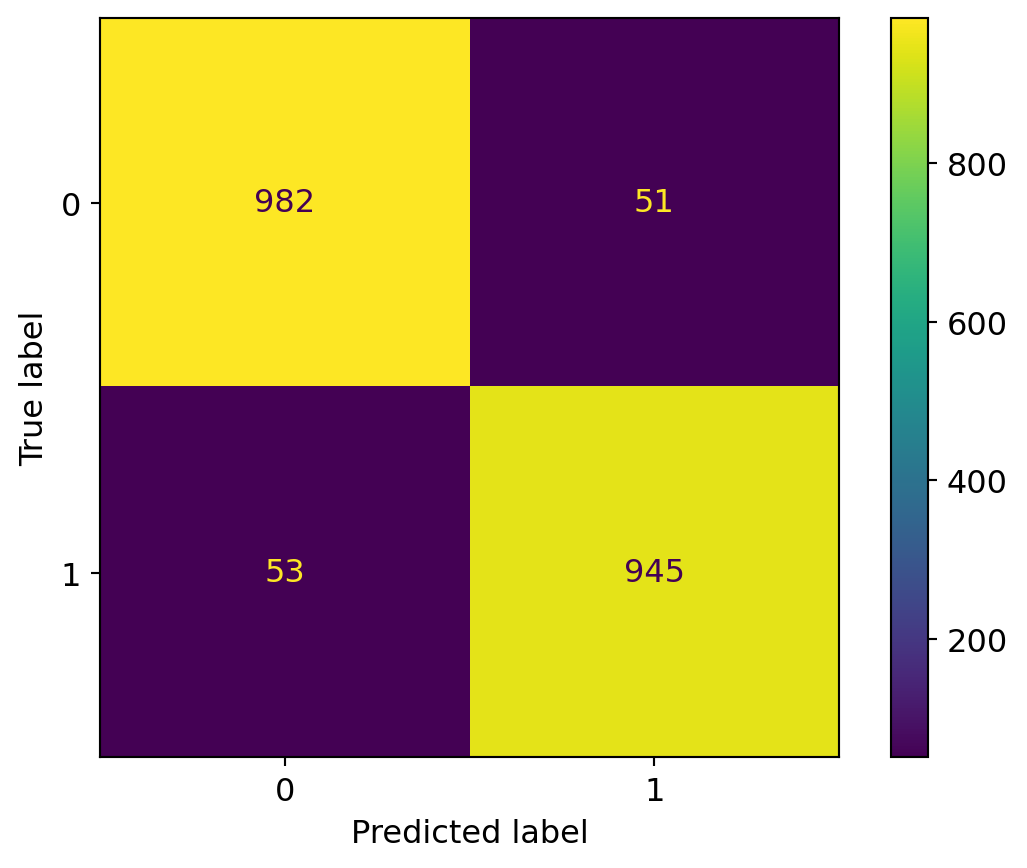
Question: What do you think of this confusion matrix? Is it satisfactory? Remember that we are trying to predict if a mushroom is edible.
ROC Curve
We can also evaluate the model’s performance before thresholding, i.e., by using the predicted numerical scores rather than binary labels, thanks to a ROC Curve.
The scores before thresholding of a scikit-learn classification model are accessible through the predict_proba method.
y_pred_scores =  my_model.predict_proba(X_test)[:, 1]
y_pred_scores
array([0.04660297, 0.9689034 , 0.94404472, ..., 0.02573543, 0.03708156,
0.92647822], shape=(2031,))y_pred_scores.shape
X_test.shape(2031, 22)fpr, tpr, thresholds = metrics.roc_curve(y_test, y_pred_scores)
max_fpr = 0.01
roc_auc = metrics.auc(fpr, tpr)
max_index_where_fpr_acceptable = np.where(fpr <= max_fpr)[0][-1]
max_tpr = tpr[max_index_where_fpr_acceptable]
fig = plt.figure(figsize=(7, 7))
plt.plot(fpr, tpr, lw=2)
# diagonal
plt.plot([0, 1], [0, 1], color='k')
plt.xlim([0.0, 1.0])
plt.ylim([0.0, 1.0])
# Add more ticks to the axes
plt.xticks(np.arange(0, 1.1, 0.1))
plt.yticks(np.arange(0, 1.1, 0.1))
plt.xlabel('false positive rate')
plt.ylabel('true positive rate')
plt.title("ROC curve of the final model")
# Add vertical line at max_fpr and horizontal line at max_tpr
plt.plot([max_fpr, max_fpr], [0, max_tpr], color='red', linestyle='--', label=f'FPR = {max_fpr:.2f}')
plt.plot([0, max_fpr], [max_tpr, max_tpr], color='red', linestyle='--')
plt.legend()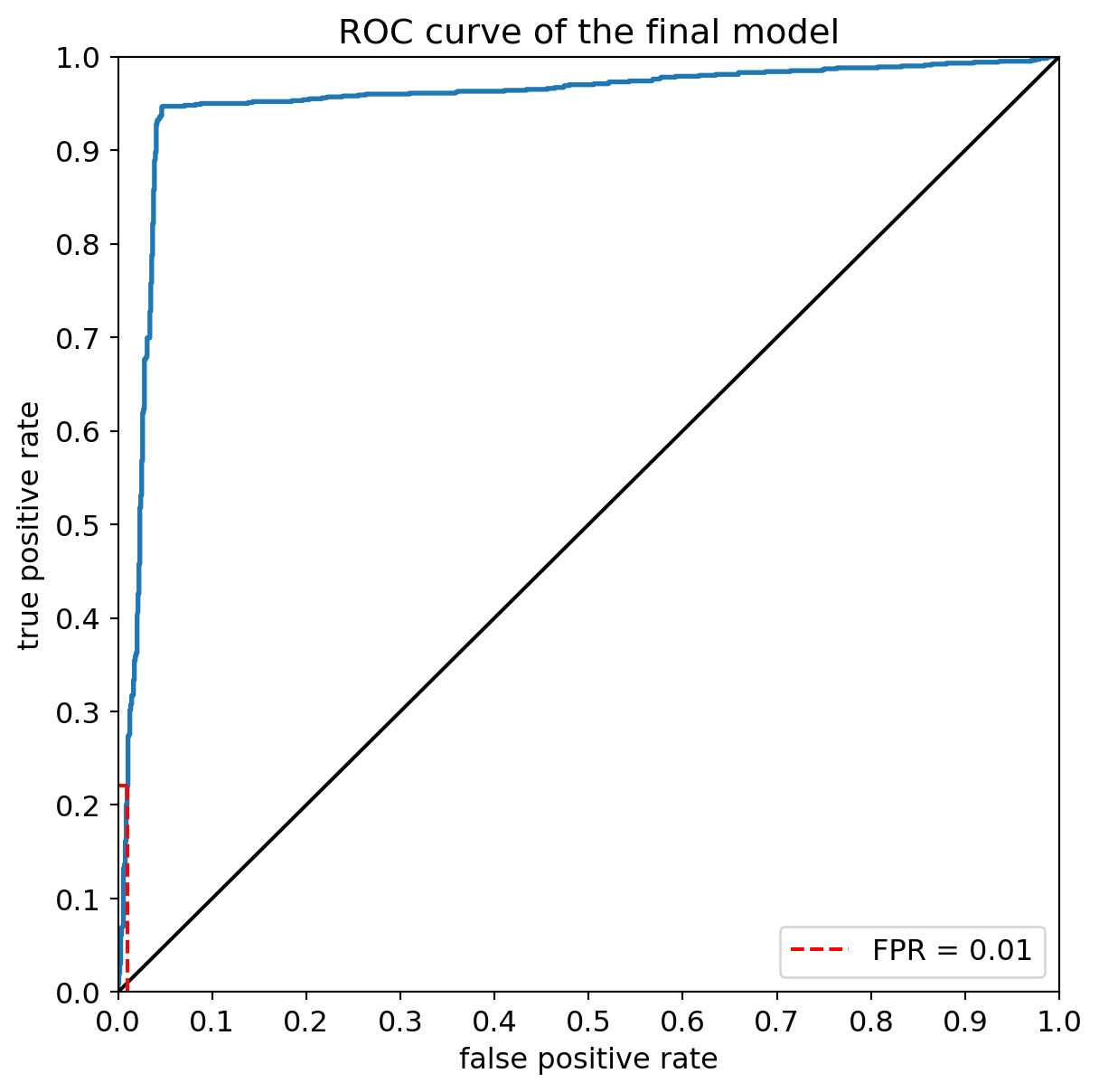
This curve can also be used to determine the true positive rate corresponding to a given false positive rate, and to determine the corresponding threshold:
print("The true positive rate corresponding to a false positive rate not exceeding %.f %% is %.f %%" % ((100*max_fpr), (100*max_tpr)))
print("It corresponds to a threshold of %.2f on the model's predictions." % thresholds[max_index_where_fpr_acceptable])
The true positive rate corresponding to a false positive rate not exceeding 1 % is 22 %
It corresponds to a threshold of 0.97 on the model's predictions.precision, recall, thresholds = metrics.precision_recall_curve(y_test, y_pred_scores)
# Calculate Area Under the Precision-Recall Curve
pr_auc = metrics.average_precision_score(y_test, y_pred_scores)
fig = plt.figure(figsize=(7, 7))
plt.plot(recall, precision, lw=2, label=f'Precision-Recall curve (AUPRC = {pr_auc:.2f})')
# Add a baseline (e.g., random classifier performance)
no_skill = len(y_test[y_test==1]) / len(y_test)
plt.plot([0, 1], [no_skill, no_skill], linestyle='--', label='No Skill')
plt.xlim([0.0, 1.0])
plt.ylim([0.0, 1.05]) # Slightly extend y-axis for better visualization
# Add more ticks to the axes
plt.xticks(np.arange(0, 1.1, 0.1))
plt.yticks(np.arange(0, 1.1, 0.1))
plt.xlabel('Recall')
plt.ylabel('Precision')
plt.title("Precision-Recall Curve of the final model")
plt.legend()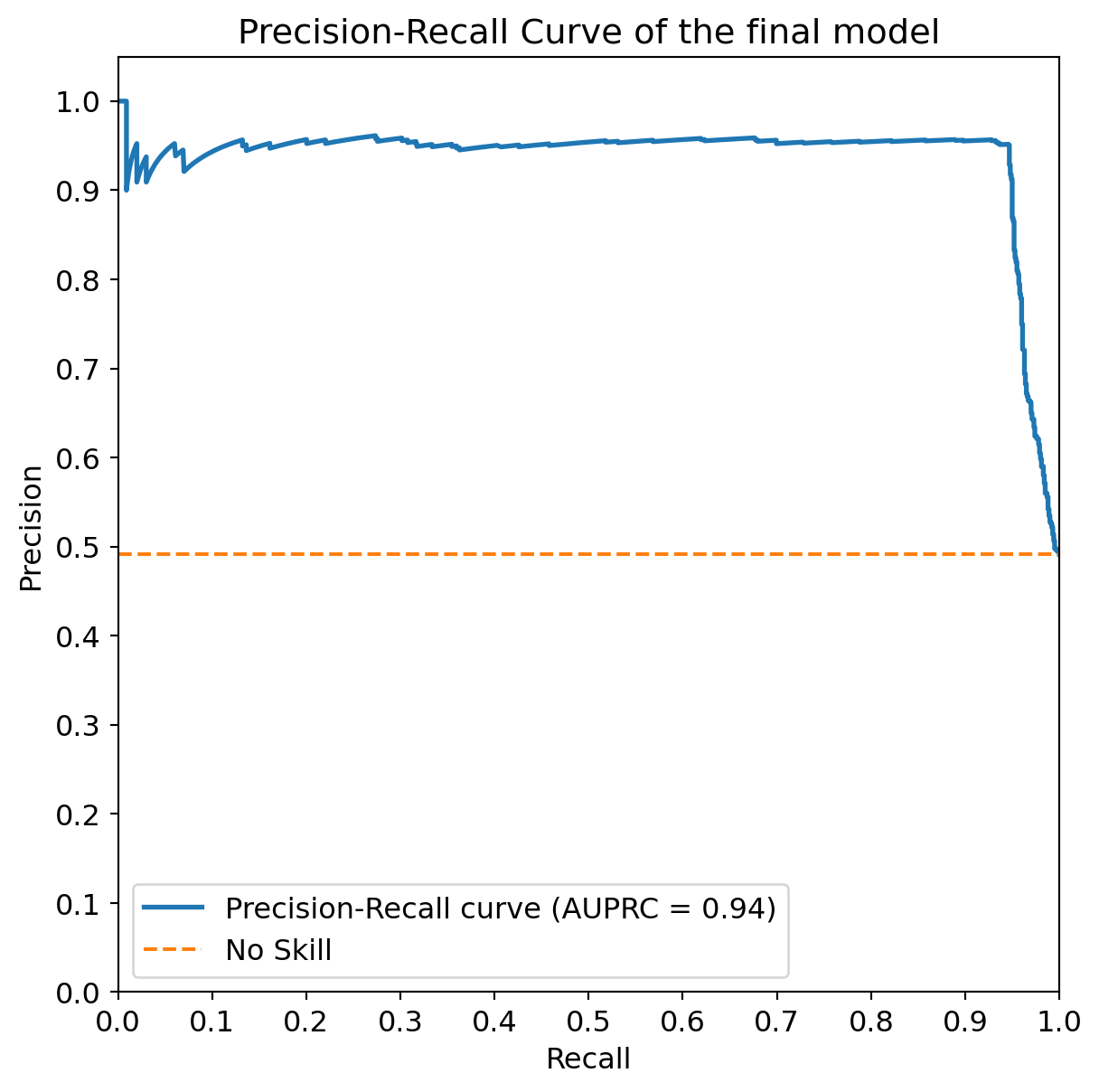
print(f"The Area Under the Precision-Recall Curve (AUPRC) is: {pr_auc:.3f}")
# Note: The concept of a single 'max_fpr' or 'max_tpr' and corresponding threshold is more applicable to ROC curves.
# For PR curves, you might evaluate precision at a certain recall level, or vice-versa, depending on your specific needs.
The Area Under the Precision-Recall Curve (AUPRC) is: 0.937Conclusion
We reached the end of this notebook, where we explored decision trees and ensemble methods for classifying mushrooms as edible or poisonous. Here is a summary of what we have covered, with the key takeaways:
We loaded and preprocessed the mushroom dataset, converting categorical features into numerical values using
LabelEncoder.We split the data into training and test sets and set up a K-Fold cross-validation strategy.
We trained and evaluated a Decision Tree Classifier with default hyperparameters, then optimized its
max_depthusingGridSearchCVand cross-validation, observing the impact of depth on performance.We visualized the optimal decision tree and analyzed variable importances, comparing them to the coefficients of a Logistic Regression model.
We explored ensemble methods:
- Random Forest: We tuned the number of trees (
n_estimators) andmax_depthusingGridSearchCV, observing improved performance compared to a single decision tree. - Gradient Boosting: We also tuned
n_estimatorsandmax_depthfor a Gradient Boosting Classifier, comparing its performance and variable importances to the other models.
- Random Forest: We tuned the number of trees (
We selected the best performing model (Gradient Boosting in this case) and evaluated its performance on the held-out test set using the F1 score.
We analyzed the Confusion Matrix to understand the types of errors made by the model and considered the implications for a mushroom classification task.
We examined the ROC curve to evaluate the model’s performance at different thresholds and identified the true positive rate at a low false positive rate, along with the corresponding threshold.
Overall, ensemble methods like Random Forests and Gradient Boosting generally outperformed a single Decision Tree on this dataset, demonstrating the power of combining multiple models. Variable importance analysis provided insights into which features were most influential in the classification process for each model.